@Jetson YOLO: Code and Run YOLOv8
This chapter moves from environment setup into an actual working YOLOv8 inference path. The main idea is simple:
- clone the Ultralytics repository
- make sure VS Code is pointing at the correct conda interpreter
- export a TensorRT engine
- run a prediction and verify output
Clone the Repository
Choose a directory where you want to store the code:
cd ~/Documents
git clone https://github.com/ultralytics/ultralytics.git
If you need a mainland China mirror:
git clone https://gitclone.com/github.com/ultralytics/ultralytics.gitIf you are working across multiple machines, storing source on NAS is also a reasonable option. The exact storage strategy matters less than keeping the Jetson-side path predictable.
Verify the Python Environment in VS Code
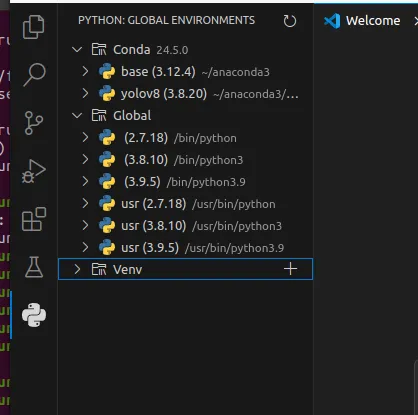
Open VS Code after cloning the repository. In the Python extension view, you should be able to see the global interpreters and the yolov8 conda environment created earlier.
Download a Model
For Jetson Orin Nano, lighter YOLOv8 variants are usually the best starting point:
Move the downloaded checkpoint into your working directory:
mv ~/Downloads/sth.pt ~/Documents/Ultralytics/Export and Run YOLOv8
Create a Python file such as train.py and start with:
from ultralytics import YOLO

# Load a YOLOv8n PyTorch model
model = YOLO("yolov8n.pt")

# Export the model
model.export(format="engine")  # creates 'yolov8n.engine'

# Load the exported TensorRT model
trt_model = YOLO("yolov8n.engine")

# Run inference, and store the predict file into ./runs directory
results = trt_model("https://ultralytics.com/images/bus.jpg", save=True)
This does two important things:
- converts the PyTorch checkpoint into a TensorRT engine
- verifies that the engine can actually run inference on-device
Select the Correct Interpreter
In VS Code, press Ctrl + Shift + P, search for Python: Select Interpreter, and choose the yolov8 conda environment.
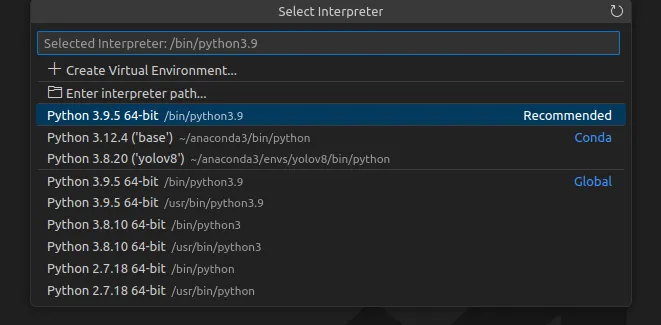
Once the interpreter is correct, run the file from VS Code.
Use jtop While Exporting
Keep jtop open in another terminal and watch the system while the model exports and runs. It is a quick way to confirm that the machine is doing what you think it is doing, especially when TensorRT export takes time.
After the script finishes, inspect the generated output under the runs directory.
If that prediction output appears correctly, the full path from conda to TensorRT to YOLO inference is working.